
Best AI PowerPoint Generators: Prompt-to-Deck vs Doc-to-Slides Compared
 0
0
 0
0
We’ve all felt the blank-slide blues—hours vanish while you nudge text boxes, willing them to look professional. AI presentation makers promise those hours back. Early data shows they can cut slide-building time by 40–90 percent—an evening reclaimed, a deadline met without the caffeine jitters. Still, speed is only part of the story; two clear approaches define the field.
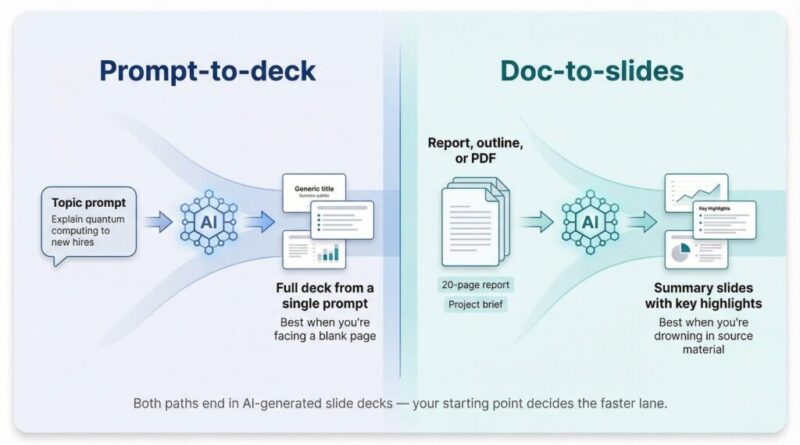
Prompt-to-deck tools spin a full presentation from a single topic prompt—ideal when you’re starting from scratch.
Doc-to-slides tools ingest an existing report, outline, or PDF and surface the highlights—perfect when your raw material already exists but needs a board-ready wrapper.
This guide benchmarks more than two dozen options so you can pick the right lane and get back to the real work.
Why you can trust this guide
We didn’t skim press releases and call it a day. We spent three weeks inside these tools, building decks for real client scenarios and timing every click.
First, we opened blank prompts and timed how long each generator needed to produce a share-ready draft. Then we flipped the test: we dropped a twenty-page report into each “Doc-to-Slides” engine and measured how faithfully it surfaced the key points.
Speed alone wasn’t enough. We graded design quality slide by slide, checking typography, color harmony, and brand-kit support. Any layout that broke when we edited text lost points.
Next, we double-checked the AI’s writing. If a tool invented a statistic or echoed the same buzzwords, it slid down the rankings. Real user chatter on Reddit and product forums served as a reality check, and our scores shifted when hundreds of customers reported the same issue.
Finally, we reviewed privacy documentation for every platform. Only tools with clear data-handling policies and enterprise security options reached the top tier.
The result is a shortlist you can trust with your deadline.
Prompt-to-deck vs doc-to-slides: choosing the right launchpad
Think of AI slide creation as two highway on-ramps.

The first, prompt-to-deck, is pure blank canvas. You type a topic such as “Explain quantum computing to new hires,” and seconds later a finished deck appears. The tool invents structure, writes copy, and adds visuals. Perfect when you have ideas but no existing material.
The second, doc-to-slides, starts with substance. Drop in a whitepaper, a spreadsheet, or even an old deck. The AI sifts, summarizes, and lifts the most relevant points into fresh slides. No blank page stress, and your hard-won data does the talking.
Prompt-driven tools win on speed and inspiration. They serve as an espresso shot for brainstorming, sales pitches, or thought-leader posts.
Document-driven tools shine when accuracy and context matter. They respect the nuance in your research report or project brief, trimming pages of prose into tight bullets you can present with confidence.
Before you pick a platform, ask one question: are you staring at an empty cursor or drowning in source material? The answer shows you the faster lane.
The 10 stand-out tools at a glance
The grid below pulls together approach, where the AI lives, signature feature, and whether you can start free. You can scan it in under a minute.
| Tool | Core approach | Works inside | Signature edge | Free plan? | Paid from |
| Plus AI | Prompt & Doc | Google Slides | Live data snapshots that refresh on click | Yes | ~$15 / mo |
| Gamma | Prompt | Web app | Full deck in <60 s with one-click restyle | Yes | $10 / mo |
| Beautiful.ai | Prompt & Manual | Web app / PPT plug-in | Brand-safe Smart Templates | Trial | $12 / mo |
| Microsoft Copilot | Prompt & Outline | PowerPoint 365 | Uses your org’s files as context | No | $30 / mo |
| Google Duet AI | Prompt & Doc | Google Slides | Built-in image generation | No | $30 / mo |
| Presentations.ai | Prompt | Web app | Slide analytics for viewer insight | Yes | $16 / mo |
| Tome | Prompt | Web & mobile | Story-style decks with AI images | Yes | $8 / mo |
| Pitch | Manual + AI assists | Web app | 20+ AI rewrite and outline actions | Yes | $20 / mo |
| Slidebean | Q&A | Web app | Guided AI pitch-deck builder | Trial | $8 / mo |
| Canva Magic Design | Doc & Prompt | Canva platform | Millions of assets in one click | Yes | $15 / mo |
Plus AI: best overall for Google Slides & Docs
With over one million installs and a 4.6 rating in the Google Workspace Marketplace, the ai presentation maker Plus AI lives right inside Google Slides, so your existing review cycle stays intact. Open a familiar file, tap the add-on, and watch an outline bloom in seconds. That low-friction start pushes Plus to the front of the pack because you stay in the workspace your team already relies on, so nothing about the review cycle changes.
Plus AI add-on interface inside Google Slides
Speed is only the opener. Plus digests a raw prompt or an entire PDF with equal ease, trimming dense paragraphs into slide-ready bullets. A quick “Remix” click reshuffles layouts until each point lands cleanly.
Design control stays intact. Because the tool edits native Slides elements, your existing templates, fonts, and brand colors remain the rule. Colleagues can tweak text, swap charts, and leave comments exactly as they would on any manual deck.
Next comes the signature feature: live Snapshots. Need the latest web-traffic metric or stock price? Capture it once, drop it into a slide, and refresh with one click before each meeting. Your quarterly update never goes stale.
Security teams breathe easier too. Plus AI carries a full SOC 2 Type II badge, confirming strict controls around data handling and access logs.
Put it together and you get an assistant that trims drafting time without forcing a new workflow or risking compliance headaches. For any Google Workspace shop, that mix is hard to beat.
Gamma: speed when the clock is ruthless
Gamma feels like ChatGPT inside a slide designer. Type three sentences, sip your coffee, and a ten-slide deck appears before the mug cools. In our tests it was the fastest generator, often beating the one-minute mark.
Layouts stay crisp and modern. If the first theme misses the mark, click “Restyle” and the tool swaps fonts, colors, and background images while leaving your text untouched. That single button turns design doubt into a two-second choice.
Gamma also handles media well. DALL·E images, GIFs, and live web embeds drop right in, so a dry proposal turns into a polished landing page.
The cost of this speed is depth. The copy reads clean but skims the surface, so plan on a quick pass to add data or nuance. When deadlines press and the brief is light, Gamma supplies the jump-start that keeps projects on track.
Beautiful.ai: designer polish without the designer
If Plus wins on familiarity and Gamma on speed, Beautiful.ai wins on style. Each time we dropped a messy outline into its Smart Templates, the slides emerged looking like an agency mood board: balanced whitespace, cohesive colors, and no text overflow.
The secret is strict guardrails. You pick a template, add content, and the software enforces alignment, font hierarchy, and color harmony. Add a long sentence and the layout flexes so nothing feels cramped. The final deck passes the brand-manager squint test with almost no manual tweaks.
Teams with strict brand kits will value the control. Upload your colors and fonts once and the AI stays on brand. Edits stay quick; drag a chart larger and every connected element resizes together, so design integrity survives late-night revisions.
Beautiful.ai is not the fastest generator, but when “good enough” slides still raise design anxiety, it offers a calm, confident fix.
Microsoft Copilot for PowerPoint: enterprise muscle built in
Copilot works where corporate storytelling already happens—inside the PowerPoint ribbon. Click the sidebar, describe the deck you need, and a structured set of slides appears, drawing on any Word docs, Excel charts, or Teams transcripts your account can reach.
Microsoft Copilot panel within the PowerPoint ribbon
Because the AI runs inside your Microsoft 365 tenant, no content leaves the walled garden. Legal and security teams stay calm, and you keep single-sign-on, version history, and familiar shortcuts.
Copilot’s real edge is context awareness. Ask it to “summarize last quarter’s financial report in five slides,” and it pulls the exact numbers from the source file—no copy-paste, no transcription errors. Need polished prose? Highlight a long paragraph and choose “Condense.” The AI rewrites while respecting your template.
The catch is cost. Copilot is an add-on that runs thirty dollars per user each month. For large enterprises already paying for E3 or E5 seats, the upgrade is easier to justify. For lean teams, it is a premium safety blanket: unmatched security and smooth integration, but at a board-level price.
Canva Magic Design & Visme: when visuals steal the show (and numbers seal the deal)
Some decks live or die on flair. Think product launches, social posts, or keynote slides that must look great on a jumbotron. Canva’s Magic Design serves those moments: drop a paragraph or outline into the editor and it pairs your words with bold typography, current color palettes, and stock imagery from one of the largest asset libraries online.
Canva Magic Design AI-generated presentation layouts
Editing stays tactile. Drag a corner, swap a photo, or ask Magic Write to punch up a headline and the layout adjusts in real time. If your brand kit is loaded, every generated slide matches your colors and fonts, so the deck feels intentional instead of improvised.
Visme walks a similar path but focuses on data. Its AI can sketch an outline, yet the true value appears when you paste numbers. One click turns raw figures into animated charts, maps, or infographic widgets that stay editable. Need an interactive report? Add hover pop-ups or a quick quiz, then share a link that records viewer analytics.
Together these two tools answer a simple brief: make content gorgeous fast. Choose Canva when you want design variety and social-ready visuals; reach for Visme when your story depends on charts that move.
Key trends shaping AI presentation tools in 2026
Integration is finally catching up with inspiration. A year ago most slide generators sat on isolated islands. Today the winning products plug straight into Google Slides, PowerPoint, or your brand library, so you can hit “Generate” without changing tabs.
Brand control moved from nice-to-have to baseline. Smart templates now lock fonts, colors, and logo placement by default, making certain every new slide follows corporate style. AI speed matters only when marketing no longer has to hunt down rogue gradients.
Live data is drifting from dashboards into decks. Tools embed refreshable charts or KPI widgets that update minutes before a meeting starts, ending last-minute searches for the latest numbers.
Multimodal content now goes far beyond stock photos. Built-in image generators create graphics on cue, and early beta features convert slide outlines into short narrated videos. Presentations are turning into content hubs that travel well on social feeds and internal wikis.
Accuracy is gaining new guardrails. Engines reference your own documents or connect to verified data sources, shrinking the “sounds plausible but is wrong” gap that hurt first-generation models.
Finally, the market understands that speed needs story. The smartest tools surface outline suggestions, speaker notes, and rewrite prompts that nudge you to tighten the narrative instead of piling on slides. The payoff is fewer decks that look slick yet feel hollow, plus more that land the point in half the pages.
Conclusion: Which AI sidekick fits your situation?
- Blank page or mountain of material?
- Blank page → pick a prompt-to-deck sprinter like Gamma, Tome, or a similar tool.
- Existing doc overload → reach for doc-to-slides leaders such as Plus AI, Copilot, or a comparable option.
- Design anxiety keeping you up?
- Yes, visuals must dazzle → lean on Beautiful.ai, Canva Magic Design, or another style-focused app.
- No, content clarity first → Visme, Presentations.ai, or a similar choice handles substance with light polish.
- Who signs the security checklist?
- Enterprise IT with strict rules → native options inside Microsoft 365, or Google Workspace, win.
- Small team with flexibility → standalone web apps deliver speed, and savings.
Circle your answers, and the shortlist will shrink to one or two names. Test a free tier tonight to see which assistant earns a permanent spot on your toolbar.
Artificial Intelligence – The Data Scientist