Image-to-STL Reality Check: When AI Actually Delivers Print-Ready Files
 0
0
 0
0
The 3D printing community has developed a healthy skepticism toward AI-generated models. We have all been burned by the demo that looks incredible on a screen but produces a file that your slicer rejects with a litany of errors—non-manifold edges, zero-thickness walls, intersecting geometry that exists only in a render. The gap between “looks good in a browser” and “actually printable” has been wide enough to discourage all but the most persistent experimenters.
So when I encountered a tool that explicitly positioned itself for functional 3D printing rather than visual AI concepts, I approached it with the kind of cautious optimism that comes from years of failed experiments. The claim was refreshingly modest: upload an image, generate a printable mesh, download an STL file ready for slicer review. No promises of replacing skilled modelers, no hype about instant perfection—just a practical tool designed to reduce the friction between a visual idea and a physical print.
This is the story of what happened when I actually tested image to stl.
The Core Difference: Print-First, Not Visual-First
Most AI 3D generators prioritize visual presentation and animation-ready models. They produce outputs that look impressive on screen but often fail when imported into slicers like Cura or PrusaSlicer. The image to stl converter I tested approaches the process differently, focusing on printable geometry from the outset.
The AI analyzes uploaded images by identifying silhouettes, depth cues, contrast, and subject boundaries, then generates a mesh specifically designed for 3D printing workflows. This is not a simple heightmap extrusion that maps brightness values onto a flat plane. The system actually interprets the subject’s silhouette, contrast, and visible depth cues to create a fuller three-dimensional starting mesh.
What the AI Actually Does
The reconstruction process evaluates several key elements: subject shape, silhouette, contrast levels, visible depth information, and object boundaries. Based on this analysis, the system generates printable 3D geometry. For photos and sketches, this creates fuller 3D forms than a simple heightmap. For logos or flat art, the output behaves more like a relief or embossed shape.
The result is a model that emphasizes structural integrity and printable forms rather than visual embellishments. Product photos, concept designs, and character illustrations retain recognizable proportions while avoiding many of the floating artifacts commonly seen in AI-generated 3D models.
Testing the Workflow: Three Stages That Actually Make Sense
The platform follows a straightforward three-stage workflow, and in practice, it is as direct as advertised.
Stage One: Upload
The upload step accepts JPG, PNG, JPEG, and WebP formats. The minimum resolution is 128×128 pixels, and the maximum file size is 8MB. These are practical constraints that ensure the AI has enough data to work with without overwhelming the processing pipeline.
In practice, the tool performs best with images that have a centered subject, strong lighting, visible edges, and a simple background. Product photos, character concepts, props, sketches, and simple part photos are ideal candidates. Thin wires, transparent objects, reflective surfaces, low-contrast photos, and busy backgrounds tend to produce weaker results.
Stage Two: Generate
This is where the tool distinguishes itself from older generation image-to-STL utilities. Traditional converters typically take a 2D image and extrude it into a flat relief or generate a simple heightmap based on brightness values. The results are predictable but limited—fine for a logo plaque, useless for a figurine.
ImgToSTL uses AI reconstruction to create a fuller 3D starting mesh from a clear photo or sketch. The generation is fast enough that you can treat it as an iterative sketchpad rather than a batch-and-wait process. The site highlights “fast iteration” as a core benefit, allowing you to generate solid model candidates quickly and validate shapes and proportions before committing to a final print.
A preview is available before you commit to downloading, allowing you to inspect and rotate the generated model. This small detail saves significant headaches—you can evaluate the geometry and decide whether the result meets your needs before spending any credits or moving to the printing stage.

Stage Three: Export
The final stage delivers the model in STL format, the standard format for most 3D printers. The platform also supports GLB, OBJ, and FBX exports for users who need broader compatibility or plan to refine the model in other software.
After downloading, the site recommends inspecting the mesh before printing. STL files contain geometry only, so scale, wall thickness, orientation, supports, and material settings must be checked in your slicer or modeling tool. Recommended tools include Cura, PrusaSlicer, Bambu Studio, Blender, Meshmixer, Fusion 360, and Tinkercad.
Real-World Testing: What Actually Happened
To evaluate practical performance, I tested the platform across several common 3D printing use cases.
Miniatures and Tabletop Props
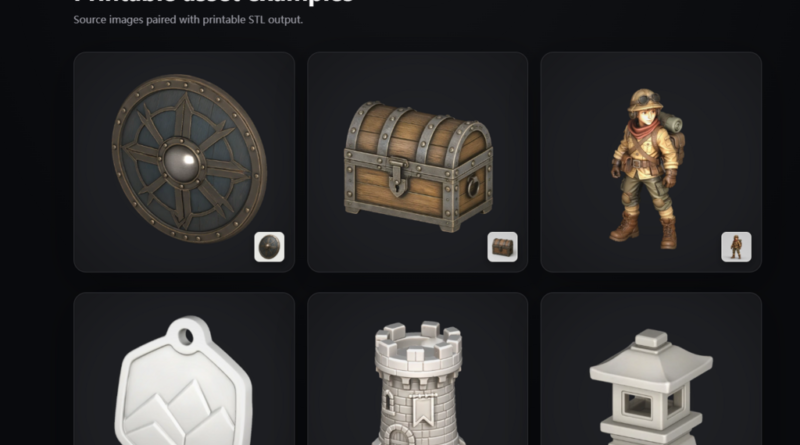
A character concept illustration with a clear silhouette and simple background served as the first test. The AI successfully generated a model that captured the character’s overall proportions and pose. While additional refinement would improve final print quality, the generated mesh provided a strong starting point compared to building the model from scratch. For tabletop gaming enthusiasts and miniature creators, the workflow offers a practical shortcut from concept art to printable figurines.
Replacement Parts From Photos
The second test involved a photograph of a broken plastic bracket with a relatively simple shape but thin features. This is the kind of use case that excites makers—the ability to photograph a broken part and generate a replacement without manual CAD modeling.
The generated mesh accurately represented the overall shape. Some thinner elements would benefit from reinforcement in Blender, but the model significantly reduced the amount of manual modeling required. For rapid prototyping and replacement-part development, this is a genuine time-saver.
Product Sketches and Concept Art
The third test used a quick product sketch with clear lines and a simple form. The resulting model accurately reflected the intended design and could serve as a prototype for further refinement in CAD software.
This workflow may be especially useful for product designers who need to move quickly from early sketches to physical models. The tool does not eliminate the need for CAD refinement, but it significantly compresses the timeline from concept to physical prototype.
Additional Capabilities: Textures and PBR Maps
Beyond the core conversion, the tool offers several additional capabilities that extend its usefulness.
Texture generation creates color texture maps for models that need visual detail. PBR map generation adds roughness and metallic material maps, which is useful for users working in game development, visualization, or any context where material properties matter.
What You Can Actually Create
The use cases extend across multiple domains. Tabletop gaming fans use it to generate figurines and props to print. Makers and tinkerers rely on it to recreate replacement parts from a photo, or to quickly move from a sketch to a tangible prototype. In cosplay and DIY, it helps design armor pieces or custom jewelry. Signage creators use it to convert image to stl for signs or embossed items. Product designers find a way to speed up their iterations by turning visual references into manipulable volumes, before refining them in traditional modeling software if needed.
The Limitations You Should Know
No tool is perfect, and this one does not pretend to be. Image quality directly impacts results. The tool performs best with clear, well-composed images. Blurry photos, low-contrast subjects, or images with busy backgrounds produce weaker results.
Complex scenes may require multiple attempts. The AI is not omniscient, and challenging inputs sometimes require a better source image or minor adjustments.
The generated model is a starting point, not a finished product. Additional refinement in Blender, Meshmixer, or your slicer may be necessary for production-ready results. The tool acknowledges this explicitly, which builds trust rather than overpromising.
Effectiveness varies by image type. Photos and sketches with clear subjects produce fuller 3D forms. Logos and flat art may behave more like relief or embossed shapes.
Who Benefits Most
This tool is most valuable for specific groups of users. Makers and hobbyists who need to turn reference images into printable models quickly will find the workflow genuinely useful. Product designers and engineers working on rapid prototypes can move from sketch to physical model in minutes rather than days. Cosplay and prop makers who work from character references can generate starting models for armor pieces and props. 3D printing beginners who lack CAD skills can bridge the gap between visual ideas and physical prints. Small business owners creating custom products or branded merchandise can generate STL models from logos or artwork without hiring a 3D modeler.
The Verdict
The image-to-STL converter I tested delivers on its core promise: it turns 2D images into printable 3D geometry. It does not pretend to replace skilled modeling, and it does not claim to produce production-ready parts with a single click. What it offers is a practical, accessible bridge between visual ideas and printable geometry. The tool focuses on creating usable printable meshes rather than producing purely visual renders, and that focus shows in the results.
In my testing, clear, well-composed images produced usable meshes on the first attempt. More challenging inputs sometimes required better source images or minor adjustments, but the rapid iteration speed made this manageable. The preview functionality, transparent workflow, and honest guidance on image selection all contribute to a tool that respects its users’ time and intelligence. For many users, that is exactly what they need.
Artificial Intelligence – The Data Scientist