5 Best AI Video Generators for Content Creation in 2026
 0
0
 0
0
AI video tools are no longer limited to making a few seconds of experimental footage. The better platforms can now write scripts, plan scenes, animate images, add narration, and assemble complete videos.
The catch is that they are not all built for the same job. Some are excellent at producing cinematic clips but leave the editing to you. Others are designed for training videos, social posts, or quick marketing content. The right choice depends on how much of the production process you want the software to handle.
Here are five of the best AI video generators to consider in 2026.
| Tool | Best for |
| Medeo | Complete videos created through chat |
| Runway | Cinematic clips and creative control |
| Adobe Firefly | Adobe users and commercial projects |
| Synthesia | Training and presenter-led business videos |
| Canva | Quick social media and design content |
1. Medeo — Best Overall AI Video Generator

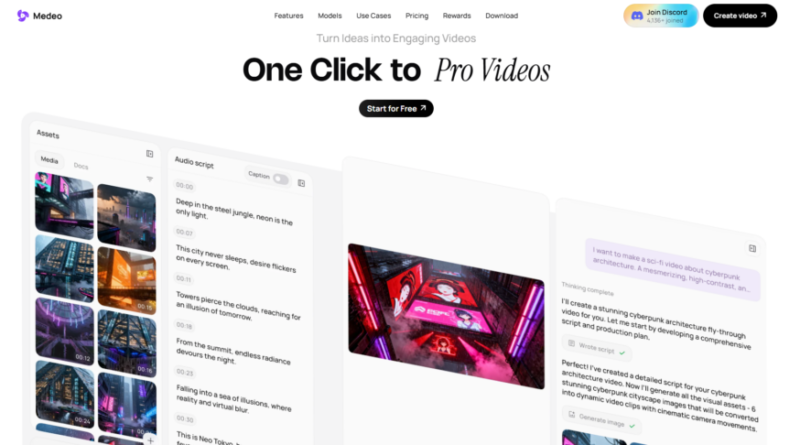
[Medeo](https://www.medeo.app/) is the strongest option for users who want a finished video rather than a collection of clips they still need to assemble.
Its main attraction is the chat-based workflow. You describe the video you want, and Medeo handles much of the work that normally happens afterward: developing the idea, organizing scenes, finding or generating visuals, adding narration, and putting the draft together.
The starting material does not have to be a polished prompt. Medeo can work with text, images, audio, documents, scripts, and URLs. A marketer can paste a product page, for example, and turn it into a short promotional video. A publisher can repurpose an article into a narrated explainer, while a creator can animate still images or build a faceless video from a written idea.
Revisions are also handled through conversation. Instead of returning to a timeline for every small adjustment, users can ask Medeo to shorten the introduction, replace a scene, change the voice, or rewrite the ending. This is particularly useful for people who know what they want to communicate but have little interest in learning professional editing software.
Medeo also provides access to several leading video and image models like [Seedanc 2.0](https://www.medeo.app/models/seedance-2-0), [GPT-Imgae-2](https://www.medeo.app/models/gpt-image-2), Veo, Kling in one platform. This gives users more creative range without requiring separate subscriptions and workflows for every model. Its supporting tools cover image generation, animation, background removal, upscaling, face swapping, and other common production tasks.
Another useful feature is Recipes. These reusable formats help creators repeat a successful video style across a series, campaign, or channel. That makes Medeo a good fit for YouTube automation, product videos, explainers, real estate content, and regular social media production.
The free plan is suitable for exploring the basic workflow. Paid plans begin with Pro at $35 per month, with lower effective monthly pricing available through annual billing.
**Best for:** Creators, marketers, educators, small businesses, and teams that want to move from an idea to a complete video in one place.
**What to know:** Fully generated scenes can use credits quickly, and complex visual requests may still require more than one attempt.
2. Runway — Best for Cinematic AI Video
Runway remains one of the best-known platforms for creators who care about the quality and direction of individual shots.
Its Gen-4.5 model supports both text-to-video and image-to-video creation, with an emphasis on visual fidelity, prompt accuracy, and motion. It is especially useful when a creator wants to describe camera movement, scene composition, timing, or atmosphere in detail.
Runway feels closer to a creative production suite than a simple automatic video maker. That makes it attractive to filmmakers, designers, advertising teams, and visual artists who want to generate footage and remain involved in the editing process.
The trade-off is that Runway expects more creative input from the user. It can produce impressive clips, but it is not always the quickest route to a complete narrated video with multiple scenes. Users looking for a largely automated workflow may find Medeo more approachable.
**Best for:** Filmmakers, visual artists, advertising concepts, cinematic B-roll, and creators who want detailed control.
**What to know:** The credit cost can rise when generating many variations, and complete projects may still need manual assembly.
3. Adobe Firefly — Best for Adobe Creative Cloud Users
Adobe Fireflyl is a natural choice for creators already working with Adobe software.
Firefly supports text-to-video and image-to-video generation and can create product shots, B-roll, social clips, and storyboard material. Users can control elements such as shot size and camera movement before taking the results into a broader Adobe workflow.
One of Firefly’s biggest advantages is integration. Generated assets can fit into projects involving Photoshop, Premiere Pro, After Effects, and other Adobe applications. Firefly also offers access to Adobe’s own model alongside selected third-party models.
Adobe says videos created with its Firefly Video Model are designed to be safe for commercial use. However, the usage terms for partner models may differ, so businesses should check which model created each asset.
Firefly works best for people who already have an established editing process. It provides high-quality creative material, but users may need other Adobe tools to turn those clips into a longer finished production.
**Best for:** Designers, agencies, editors, and existing Creative Cloud users.
**What to know:** It is particularly strong as part of the Adobe ecosystem rather than as a fully automatic video-production service.
4. Synthesia — Best for Business and Training Videos
Synthesia takes a different route from cinematic video generators. Its main strength is presenter-led content created with AI avatars.
Users can begin with a prompt, script, document, presentation, or URL. Synthesia then creates a structured video that can include an AI presenter, voiceover, slides, and supporting visuals. Its editor works more like a presentation tool than a traditional video timeline.
The platform is particularly useful for employee onboarding, training, internal communications, sales material, and product explainers. It also supports video translation into more than 160 languages, making it a practical option for international organizations.
Synthesia now includes generative B-roll features, but avatars remain the main reason to choose it. Creators making entertainment, cinematic stories, or highly visual social content may prefer a broader platform.
**Best for:** Training departments, international companies, internal communications, and avatar-led explainers.
**What to know:** Its polished corporate style will not suit every creative project.
5. Canva — Best for Quick Social Content
Canva is a convenient choice for users who already create social posts, presentations, and marketing graphics in Canva.
Its AI video generator can turn text prompts into short video clips with synchronized audio. Those clips can then be combined with Canva’s templates, stock library, text tools, animations, and brand assets.
Canva is not as specialized as Medeo or Runway, but it is easy to learn and works well for short promotional content. Teams can also reuse existing logos, colors, and design templates without rebuilding their brand materials in another platform.
It is most useful when AI-generated footage is only one part of a larger design. For longer videos or more automated scene planning, a dedicated AI video platform will provide a more complete workflow.
**Best for:** Social media managers, small businesses, presentations, and simple marketing videos.
**What to know:** Advanced video generation and detailed editing are not its main strengths.
Which AI Video Generator Should You Choose?
Runway is the better choice for generating carefully directed cinematic shots, while Adobe Firefly makes sense for professionals already using Creative Cloud. Synthesia stands out for avatar-led training and corporate communication, and Canva is convenient for quick social content.
For most users who want AI to handle more than a single clip, Medeo is the most complete option. It brings ideas, source materials, generation models, narration, editing, and revisions into one conversational workflow. That reduces the number of tools—and the amount of production knowledge—needed to turn an idea into a video ready to share.
Artificial Intelligence – The Data Scientist