Why I Switched From Studio to AI for My Headshot
 0
0
 0
0
For years, the professional headshot has been a necessary evil—expensive, inconvenient, and almost always awkward. You schedule weeks in advance, pay a studio hundreds of dollars, sit through an hour of forced smiles, and end up with five usable photos that all look slightly off. Then came the AI headshot boom, which promised studio quality from your phone but often delivered uncanny-valley results that looked nothing like you. So when I came across AI professional headshot generators, I was skeptical. Another tool promising magic? I decided to test it properly—not as a tech reviewer, but as someone who actually needs a decent headshot for LinkedIn, client proposals, and the occasional conference bio.

The Real Test: Can a Few Selfies Replace a $500 Studio Session?
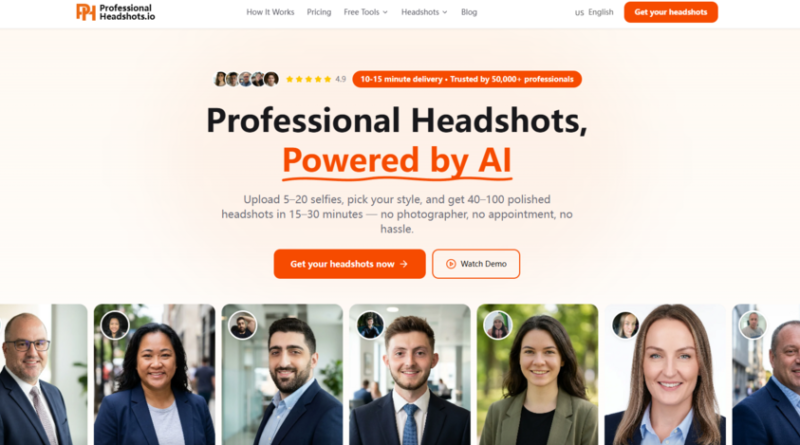
The core promise of this platform is straightforward: upload 5–20 casual phone photos, wait 15–30 minutes, and receive 40–100 polished headshots. No photographer, no appointment, no studio travel. That sounds great in theory, but the real question is whether the output actually looks like you—and whether it looks professional enough to use on your company website or LinkedIn profile.
I approached this the way any busy professional would: with low expectations and a tight deadline. I grabbed a dozen random selfies from my camera roll—different angles, mixed lighting, nothing staged. Some were in bright daylight, others under warm indoor lights. A few were from weird angles that I would never normally share. The platform doesn’t ask for perfect photos; it actually recommends variety. That was my first clue that this wasn’t another template-based filter.
How the Platform Actually Works
The process is deliberately minimal. There is no account creation required upfront, no complex settings to configure, and no subscription to manage. You upload, you choose, you wait.
Step One: Upload Your Selfies
What You Actually Need to Provide
The platform asks for 5–20 casual photos from your phone. The key word here is casual. These are not headshots—they are everyday photos that show your face from different angles and under different lighting conditions. The system uses these to build a personalized model of your face, so variety matters more than quality. A mix of close-ups and slightly wider shots, some with natural light and some with indoor light, seems to produce the best results. No professional camera is required.
What Happens to Your Photos
This was my biggest concern going in. Uploading personal photos to an AI service always carries privacy risks. The platform states that your selfies are used exclusively to generate your headshots—they are not sold, not shared, and not used to train the AI models. Files are encrypted during upload and storage, and they are automatically deleted after 30 days. The service is also GDPR and CCPA compliant, which adds a layer of accountability for users in regulated regions. Full commercial usage rights are included, meaning you can use the resulting photos for anything from your LinkedIn profile to press releases without worrying about licensing.
Step Two: Choose Your Style
The Range of Options
Once your photos are uploaded, you select your industry, outfit styles, and backgrounds. The platform offers 30+ outfit styles across five professional categories, 14 scene backgrounds (studio, office, outdoor, and premium options), and three pose angles per look—frontal, left three-quarter, and right three-quarter. The categories span business formal, casual, executive, medical, legal, tech, and more. This is where the platform distinguishes itself from traditional studio shoots, which typically offer only one or two outfit changes per session.
How the AI Personalizes Your Model
After you select your style preferences, the AI trains a personalized model of you. This is not a generic filter that slaps your face onto a template. The system generates every combination of your selected styles and backgrounds, producing a range of looks from a single upload session. The result is dozens of variations that all maintain consistent facial features while offering different professional contexts.
Step Three: Receive Your Headshots
Delivery Time and Output
The platform delivers 40–100 polished headshots within 15–30 minutes. The exact time depends on the package you choose: Basic delivers in 20–30 minutes, Pro in 15–20 minutes (priority queue), and Executive in 10–15 minutes (VIP priority). In my testing, the Pro package delivered in about 18 minutes—well within the stated window. The output included 70 photos across eight unique looks, each combining a scene, outfit, and pose angle.
What the Photos Actually Look Like
The results were surprisingly consistent. Facial features remained recognizable across all variations—no warping, no strange artifacts, no uncanny-valley effects. The lighting was natural and flattering, and the backgrounds integrated cleanly without looking pasted on. Some shots looked like they could have been taken in a proper studio. Others had a more casual, approachable feel suitable for startup websites or team pages. The variety meant I could pick and choose based on the context: formal for LinkedIn, slightly relaxed for email signatures, and fully polished for conference bios.
The Price Difference Is Hard to Ignore
The pricing structure is simple and one-time. No subscriptions, no recurring fees. The Basic package costs $29 (originally $44) and includes 40 headshots, four unique looks, LinkedIn-optimized framing, high-resolution downloads, and five regeneration credits. The Pro package, which the platform markets as the best value, costs $49 (originally $69) and includes 70 headshots, eight unique looks, corporate and press-ready output, priority delivery in 15–20 minutes, and ten regeneration credits. The Executive package costs $79 (originally $109) and includes 100 headshots, unlimited looks, access to all scenes and styles (including medical, legal, and executive categories), 4K high-resolution downloads, VIP delivery in 10–15 minutes, 20 regeneration credits plus one free complete redo within 30 days, and VIP support.
Compared to a traditional studio session, which typically costs $200–$500 for 5–10 photos with one or two outfits and requires scheduling, travel, and a 2–5 day turnaround, the value proposition is clear. The platform delivers 40–100 photos with 30+ styles and 14 backgrounds, available 24/7 from home or office. Regeneration credits are included for adjustments, whereas studios charge for reshoots.
| Aspect | Traditional Studio | This Platform |
| Cost | $200–$500 per session | From $29 one-time |
| Turnaround | 2–5 days | 15–30 minutes |
| Number of Photos | 5–10 | 40–100 |
| Style Variety | 1–2 outfits | 30+ styles, 14 backgrounds |
| Availability | Appointment required | 24/7 instant access |
| Location | Travel to studio | From home or office |
| Revisions | Paid reshoot | Regeneration credits included |
Where It Excels and Where It Falls Short
What Works Well
The platform is remarkably good at maintaining facial consistency across dozens of variations. In my testing, the AI preserved individual features—eye shape, smile dynamics, skin tone—without the homogenization that plagues many AI portrait tools. The range of styles is genuinely useful: having 70 photos across eight looks means you can choose different shots for different platforms without reusing the same image everywhere.
The privacy policy is another strong point. The commitment to not training on user photos, not selling or sharing them, and automatically deleting them after 30 days addresses the primary concern most professionals have about uploading personal images to an AI service. The inclusion of full commercial usage rights means you are not locked into restricted licensing for professional use.
Where Results May Vary
The quality of the output depends significantly on the quality and variety of the input photos. In my testing, a mix of well-lit, varied-angle selfies produced excellent results. However, users who upload only similar-looking photos from the same angle may see less variation in the output. The platform’s guidance to use different angles and lighting is not just a suggestion—it directly affects the AI’s ability to build an accurate model.
Complex scenes or highly specific outfit requests may require multiple attempts. The regeneration credits included in each package are designed to address this, allowing you to refine specific shots without starting over. But from a practical user perspective, the results are not guaranteed to be perfect on the first try every time. The platform appears to handle standard professional contexts well—LinkedIn, corporate bios, press releases—but more niche or highly stylized requests may take additional iterations.
Who This Is Actually For
Based on my testing, this platform is best suited for professionals who need a quality LinkedIn headshot without the time, cost, or inconvenience of a traditional studio session. It is particularly valuable for job seekers updating their profiles, consultants refreshing their websites, and professionals in remote or hybrid roles who do not have easy access to a photographer.
It is also a practical option for teams and small businesses that need consistent headshots for multiple employees. The one-time payment model and instant delivery make it easy to scale across a group without coordinating studio appointments for everyone.
For senior professionals who require the highest level of polish and variety, the Executive package offers 4K resolution, unlimited looks, and access to specialized categories like medical and legal. The VIP support and free complete redo within 30 days provide additional peace of mind for those who cannot afford to compromise on their professional image.
The Verdict: A Practical Alternative, Not a Magic Bullet
The platform delivers on its core promise: a fast, affordable way to generate professional headshots from everyday photos. It does not replace the creative direction of a skilled photographer for high-end editorial work, and it requires thoughtful input to produce the best results. But for the vast majority of professional use cases—LinkedIn, company websites, email signatures, conference materials—it offers a compelling alternative that is hard to dismiss.
The 50,000+ professionals who have used the service are not all wrong. The feedback from users ranges from surprise at the quality to genuine career outcomes like increased profile views and interview requests. One user noted that their recruiter texted asking who their photographer was. Another reported updating their LinkedIn and receiving three interview requests by the end of the week. A third, who had previously paid $300+ for studio sessions, found the AI results just as good—maybe better.
The platform is not perfect. The quality of your results will depend on the quality of your input. Complex requests may need multiple attempts. But for professionals who need a reliable, accessible way to update their professional image, it is a practical tool that works more often than it does not. And at a starting price of $29, the cost of trying it is significantly lower than the cost of a single studio session.
Artificial Intelligence – The Data Scientist