
5 Best Napkin AI Alternatives in 2026 (Top AI Diagram Tools Compared)
 0
0
 0
0
AI diagram tools are getting more popular in 2026. People now want faster ways to turn ideas into clear visuals. Tools like Napkin AI helped many users start, but now users want more control, mobile access, and smarter features. That’s why many are searching for a best Napkin AI alternative that fits their daily needs.
Whether you are a student, creator, or team member, choosing the right tool matters. In this guide, we will explore every Napkin AI alternative available today and help you pick the right alternative to Napkin AI without confusion or wasted time.
What Is Napkin AI?
Napkin AI is a browser-based visual creation tool that turns written content into diagrams, charts, and other presentation-ready graphics. Instead of arranging shapes manually, you can paste or write text, generate a visual, and then refine the result.
Its main appeal is speed. Students, marketers, educators, and business teams can use it to explain an idea, summarize a process, or add a visual to a presentation without starting from a blank canvas.
Here’s why people like it:
- Generates visuals from text prompts
- Offers a beginner-friendly editing workflow
- Works well for summaries, presentations, and simple processes
- Supports browser-based creation on desktop
However, users with more specialized requirements may need an alternative with better mobile editing, technical diagramming, or team controls.
Why Consider a Napkin AI Alternative?

Napkin AI is effective for quick text-to-visual creation, but several practical constraints can make another tool a better choice. Most notably, Napkin currently allows mobile users to view projects but not register or edit them. It also requires an internet connection, which matters if you work while traveling or in restricted environments.
Common reasons to compare alternatives include:
- No full mobile editing experience
- Usage and export limits vary by plan
- Less granular control than specialist diagramming software
- No offline mode
- Not designed for every technical or data-heavy workflow
These are not deal-breakers for everyone, but they are useful criteria when deciding whether to switch.
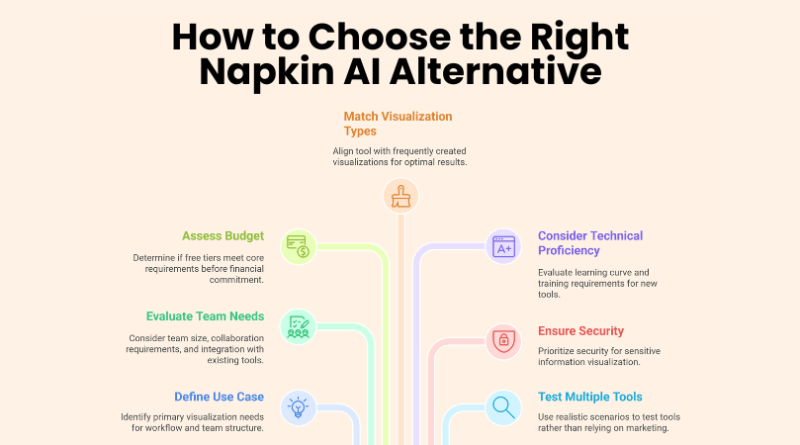
How to Choose the Right Alternative
The best alternative depends on the visual you need to create and how your team works. Evaluate each product against a short list of practical requirements rather than choosing solely on the number of templates or AI features.
Key criteria to compare:
- AI output quality and supported diagram types
- Mobile viewing and editing on iOS and Android
- Manual editing, branding, and layout controls
- Export formats such as PDF, PNG, SVG, and PPT
- Sharing, comments, permissions, and real-time collaboration
- Free-plan limits, pricing, and overall performance
Prioritize the two or three criteria that affect your daily workflow most. A simpler tool can be the better choice if it removes friction from the work you do repeatedly.
5 Best Napkin AI Alternatives in 2026
The five tools below cover distinct needs: fast AI-generated visuals, professional diagramming, collaborative planning, technical documentation, and workshop-style brainstorming. Product capabilities and plan limits were checked in July 2026, but they can change over time.
1. Diagrimo (Best Overall Alternative)
Diagrimo is a strong choice for people who want to turn text into diagrams, charts, or infographics with minimal setup. Its AI assistant can also polish, simplify, translate, or expand source text before you visualize it. You can adjust text, shapes, colors, lines, and layouts, then export or share the result. Diagrimo offers a free plan with daily credits; paid plans add higher limits, premium templates, and additional export options. Because it is primarily web-based, test the editor on your phone before choosing it specifically for mobile work.
Key Features:
- AI text-to-visual generation for diagrams and infographics
- Browser-based workspace with shareable links
- Editable text, shapes, colors, lines, and layouts
- Free daily credits plus paid export and template options
2. Lucidchart (Best for Professional Diagramming)
Lucidchart is a mature diagramming platform for teams that need structured, editable documentation. It supports flowcharts, ERDs, architecture diagrams, data linking, real-time co-authoring, and AI-assisted generation and iteration. It is a better fit than Napkin AI when precision, governance, integrations, or repeatable business processes matter more than instant visual storytelling.
Pros:
- Robust real-time collaboration and commenting
- Strong technical diagram and data-linking features
- Broad integrations and enterprise controls
Cons:
- Limited free plan
- Steeper learning curve than text-first visual tools
- Advanced capabilities may require a paid team plan
3. Creately (Best for Visual Planning)
Creately combines diagramming with a shared visual workspace for project planning, mind maps, process design, and team discussions. Its mix of templates, databases, and collaborative canvases makes it useful when a diagram is part of a larger planning workflow rather than a one-off graphic.
Pros:
- Useful for planning and cross-functional teamwork
- Large template library and flexible canvas
- Real-time editing and collaboration tools
Cons:
- Free plan has usage and feature limits
- The workspace can feel busy on complex boards
- Some advanced features require a paid plan
4. EdrawMax (Best for Advanced Diagram Types)
EdrawMax is designed for users who create detailed technical and business diagrams. Its broad shape libraries, templates, file-format support, and desktop software make it suitable for network diagrams, floor plans, engineering visuals, and other projects that need more manual control. It is especially relevant when offline desktop work is a requirement.
Pros:
- Extensive libraries for technical and business diagrams
- Desktop editing supports offline workflows
- Broad template and file-format support
Cons:
- Takes time to learn
- Most serious workflows require a paid license
- Feature-rich interface can feel overwhelming
5. Miro AI (Best for Brainstorming and Workshops)
Miro is a collaborative whiteboard built for brainstorming, workshops, research, and project planning. Its AI tools can help organize ideas and generate or summarize board content, while the infinite canvas supports flexible, non-linear work. Choose Miro when participation and facilitation matter more than producing a tightly structured technical diagram.
Pros:
- Excellent for workshops and distributed teams
- Flexible templates and an approachable canvas
- Mobile apps support viewing and board participation
Cons:
- Less specialized for formal technical diagrams
- Free plan is limited
- Large boards can become difficult to navigate
Napkin AI Alternatives: Quick Comparison
Use this table as a starting point, then confirm the current plan details on each product’s website before subscribing.
| Tool | Best For | Mobile Access | AI Focus | Free Access |
| Diagrimo | Text-to-visual creation | Mobile browser; test editing | Strong | Free plan |
| Lucidchart | Professional diagrams | iOS app and mobile web | Strong | Limited free plan |
| Creately | Visual planning | Web and mobile options | Moderate | Limited free plan |
| EdrawMax | Technical diagrams | Desktop and mobile apps | Moderate | Free trial/limited access |
| Miro AI | Workshops and brainstorming | iOS and Android apps | Strong | Limited free plan |
Which Napkin AI Alternative Should You Choose?
Choose based on the work you need to complete, not on a generic ranking. If you mainly turn written ideas into presentation-ready visuals, Diagrimo offers a direct workflow. Teams that maintain complex diagrams may prefer Lucidchart, while workshop facilitators may get more value from Miro.
A simple decision guide:
- Choose Diagrimo for fast text-to-visual creation
- Choose Lucidchart for professional diagrams and governance
- Choose Creately for collaborative visual planning
- Choose EdrawMax for technical diagrams and offline desktop work
- Choose Miro for workshops, brainstorming, and an infinite canvas
If mobile editing is essential, test the exact features you need on iOS or Android before committing; mobile apps and mobile browsers do not always match the desktop editor.
FAQs
1. What is the best Napkin AI alternative in 2026?
Tenorshare AI Diagrimo is widely seen as the best napkin ai alternative in 2026. It offers strong AI diagram generation, simple controls, and works well for both beginners and professionals who want quick and clear visual outputs.
2. Are there free Napkin AI alternatives available?
Yes, there are several tools with free plans. Diagrimo and Miro both offer basic features at no cost. These options work well as a napkin ai alternative free for users who want to try diagram tools without paying upfront.
3. Which alternative is best for mobile users?
Diagrimo is one of the best tools for mobile users. It runs smoothly on both Android and iOS devices. This makes it a strong napkin ai alternative for android and also a reliable option for iPhone users.
Conclusion
Napkin AI is still helpful for simple tasks, but it starts to feel limited as your needs grow. Many users now look for better features, mobile access, and smarter tools that can handle more complex ideas. That’s why choosing the right Napkin AI alternative becomes important. Tools like Diagrimo, Lucidchart, and Miro give users more options and flexibility for different types of work.
If you want something easy and balanced, Diagrimo is a strong choice and works well as the best Napkin AI alternative. Still, the right tool depends on your daily work and personal needs.
Artificial Intelligence – The Data Scientist