
AI in User Research: How Product Teams Make Better Design Decisions
 0
0
 0
0
Product teams rarely suffer from a lack of customer data. They collect product analytics, support conversations, surveys, usability test recordings, user interviews and feedback from customer-facing teams. The real challenge is converting this information into clear product decisions.
AI in user research can reduce some of this operational work. It can help teams transcribe interviews, summarize sessions, organize qualitative feedback, identify recurring themes and locate supporting evidence. However, AI should not be treated as a replacement for real participants or researcher judgment.
The most effective approach combines AI-assisted analysis with human interpretation. AI handles repetitive processing, while researchers, designers and product managers evaluate context, challenge assumptions and determine what the findings mean for the product.
Why AI in User Research Matters
Analytics can identify where users drop off, but they may not explain why. Surveys can reveal dissatisfaction, but they often lack the context needed to understand the underlying problem.
AI-supported research helps teams process this information more efficiently. It can generate transcripts, summarize sessions, group similar comments and highlight moments that may require closer review. This makes it easier to include research in regular product cycles rather than conducting it only before major launches.

The objective is not to automate every part of research. It is to help teams move from a research question to validated evidence more efficiently.
1. Begin With the Product Decision
A research project should start with the decision the team needs to make, not with a particular tool or AI feature.
Beginning with the decision helps teams select the right research method.
A navigation problem may require tree testing. A confusing workflow may require task-based usability testing. Early-stage product ideas may benefit from user interviews or concept testing. A team comparing design alternatives may use preference testing.
AI can support any of these methods, but it cannot compensate for an unclear research question. Without a defined decision, teams may collect large amounts of feedback that do not lead to meaningful action.
2. Use AI to Improve Research Preparation
AI can help product teams prepare interview questions, usability tasks, survey prompts and follow-up questions.
However, AI-generated questions must still be checked by a human.
Poorly written questions may lead participants toward a preferred answer. A usability task may accidentally reveal where the user needs to click. An interview prompt may contain assumptions that influence the response.
AI should improve the quality of preparation, not independently determine what the team should ask.
3. Reduce Manual Work With Transcription and Summaries
One of the most practical uses of AI in user research is processing session recordings.
AI transcription converts recordings into searchable text. Summaries provide an initial overview of each session. Automated tags can group responses related to topics such as onboarding, pricing, navigation or feature expectations.
A modern UX research platform such as UXArmy can help teams organize user interviews, usability studies and qualitative feedback within one research workflow.
This does not mean that teams should accept every generated summary without review. Important findings should still be checked against the original recording or transcript.
AI provides a first pass. Human researchers determine whether the summary accurately represents what the participant said and whether the observation is relevant to the product decision.
4. Use AI to Identify Patterns Across Participants
The value of qualitative research comes from identifying patterns without ignoring individual context.
However, frequency alone does not determine importance. A problem mentioned by one participant may still be serious if it prevents task completion. A frequently mentioned preference may be less important if it has little effect on usability.
AI can organize the evidence, but product teams still need to judge the significance of each pattern.
5. Combine Behavioral and Qualitative Evidence
Strong product decisions rarely come from a single type of research data.
A click map may show that users repeatedly select a non-interactive image. A screen recording may show that they pause before clicking it. A follow-up question may reveal that the image looks similar to buttons elsewhere on the page.
Together, these signals create a useful finding:
Participants attempted to click the image because its visual treatment suggested that it was an interactive element.
This is more actionable than simply reporting that users clicked the wrong area.
Usability testing platforms often provide multiple forms of evidence, including task completion, navigation paths, recordings, participant comments and click behavior. Product teams should use these sources together rather than treating each metric independently.
The same principle applies to usability testing tools and product analytics. Analytics may reveal the location of a problem, while user research helps explain the reason behind it.
6. Keep Every Important Finding Traceable
AI-generated summaries can make research easier to review, but they also create a risk: stakeholders may accept conclusions without seeing the evidence behind them.
Consider the difference between these two findings:
General statement:
Users found onboarding confusing.
Traceable statement:
Four of six participants paused at the permissions screen, and three said they did not understand why account access was required.
The second statement identifies the behavior, indicates how often it occurred and explains the probable cause. It gives the product team something specific to investigate.
Traceability also helps researchers identify when AI has removed important context, misunderstood a statement or overgeneralized one participant’s feedback.
7. Use Human Judgment to Interpret AI Outputs
AI is effective at processing large amounts of text and identifying linguistic similarities. Human researchers are better equipped to understand context, motivation, contradiction and emotional nuance.
Researchers must therefore review findings that could influence major product decisions.
The goal is not to repeat all the manual work that AI has completed. It is to validate the findings that matter.
8. Select Tools Based on the Research Workflow
Product teams have access to many categories of research technology, including UX research software, remote testing platforms, interview platforms, survey tools and UX testing software.
A platform should make research easier to conduct and evaluate. It should not force teams to change their methodology simply to match the tool’s features.
For distributed teams, remote usability testing tools can help researchers evaluate prototypes and live digital experiences with participants across different locations. For teams conducting frequent interviews, transcription and analysis features may be more important. Complex workflows, sensitive topics and exploratory studies may still require moderated research.
The best UX research software should support the complete research process, from study setup and participant observation to analysis, collaboration and reporting.
9. Turn Research Findings Into Product Actions
Research creates value only when it influences a decision.
For example, an unclear icon noticed by one participant may be a low-priority observation. A payment error that prevents several participants from completing checkout is a high-priority issue.
AI can help organize findings, but prioritization must reflect product goals, user impact and development constraints.
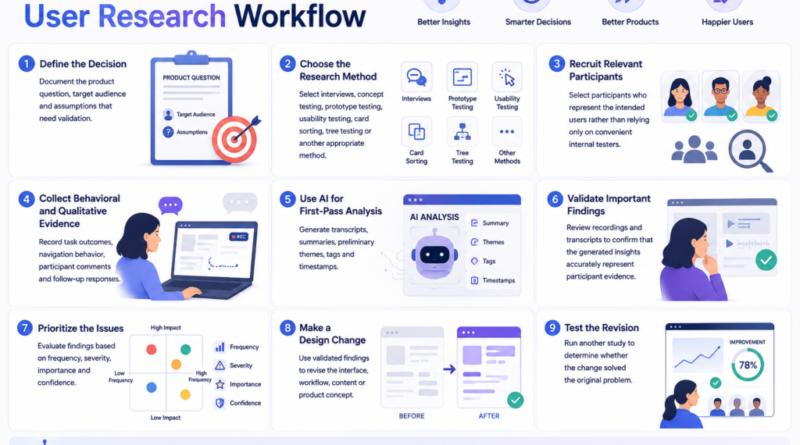
A Practical AI-Assisted User Research Workflow
Step 1: Define the Decision
Document the product question, target audience and assumptions that need validation.
Step 2: Choose the Research Method
Select interviews, concept testing, prototype testing, usability testing, card sorting, tree testing or another appropriate method.
Step 3: Recruit Relevant Participants
Select participants who represent the intended users rather than relying only on convenient internal testers.
Step 4: Collect Behavioral and Qualitative Evidence
Record task outcomes, navigation behavior, participant comments and follow-up responses.
Step 5: Use AI for First-Pass Analysis
Generate transcripts, summaries, preliminary themes, tags and timestamps.
Step 6: Validate Important Findings
Review recordings and transcripts to confirm that the generated insights accurately represent participant evidence.
Step 7: Prioritize the Issues
Evaluate findings based on frequency, severity, importance and confidence.
Step 8: Make a Design Change
Use validated findings to revise the interface, workflow, content or product concept.
Step 9: Test the Revision
Run another study to determine whether the change solved the original problem.
Conclusion
AI in user research is most valuable when it removes repetitive work without weakening the connection between product decisions and real user evidence.
It can help teams prepare studies, transcribe sessions, summarize feedback, organize themes and locate important moments more efficiently. Researchers, designers and product managers must still validate the outputs, interpret context and decide which findings matter.
The future of user experience research is not completely automated. It is a collaborative model in which AI handles processing and organization while people remain responsible for research quality, ethical judgment and product action.
When teams maintain this balance, AI and user research can help them make faster, clearer and more defensible design decisions.
Frequently Asked Questions
What should teams look for in UX research software?
Teams should evaluate supported research methods, recording quality, transcription, evidence traceability, collaboration, multilingual capabilities, privacy controls and compatibility with their existing workflow.
What is the difference between UX research software and usability testing tools?
UX research software may support several research methods, including interviews, surveys, card sorting and usability testing. Usability testing tools focus more specifically on observing how users interact with prototypes, websites or applications.
Artificial Intelligence – The Data Scientist