
AI Minecraft Skin Generator: Create Custom Minecraft Skins in Seconds
 0
0
 0
0
There’s nothing quite like joining a new Minecraft SMP server, only to realize half the lobby is wearing the exact same “neon hoodie boy” or “pastel cottagecore girl” skin they copied from the Skindex. We all want a character that actually stands out, but let’s be honest: spending hours editing a 64×64 pixel grid on a Sunday afternoon just to get the shading right on a jacket is exhausting. If you don’t have the artistic patience for manual pixel-pushing, using an AI Minecraft skin generator is the ultimate shortcut. Over the past few weeks, I’ve been testing tools like AIAI.com to see if AI can actually output clean, import-ready skins without the usual pixelated mess. Here’s my honest take on how it fits into a player’s workflow.

What Actually Is an AI Minecraft Skin Generator?
If you’ve ever tried asking Midjourney or ChatGPT to ‘make a Minecraft skin,’you probably ended up with a useless 3D render. A true AI Minecraft skin generator doesn’t just paint a 3D character; it writes pixel data onto a precise 2D template.Tools like AIAI.com are trained specifically on Minecraft’s 64×64 and 128×128 skin coordinates. When you type a prompt, it unfolds the design perfectly,mapping the head, body, arms, and legs, and even generates the outer ‘jacket’ layer for that 3D depth in-game.
Manual Editing vs. Public Downloads vs. AI: What’s the Real Difference?
When you decide it’s time to upgrade your character’s look, you basically have three paths to choose from. Having tried all of them over years of playing Minecraft, here is my honest breakdown of how they actually stack up in terms of time, effort, and uniqueness:
- Manual Pixel Editing (The High-Effort Way)
We’ve all opened traditional editors like Nova Skin or Planet Minecraft with a cool idea in mind. But the reality of pixel art is brutal. If you don’t understand color theory and shading, your skin ends up looking flat and amateurish. If you try to fix this by using the “noise” brush randomly, your character just looks like a glitched TV screen. To get a high-quality skin with proper dual-layer details (like 3D hair or a textured jacket), you are looking at several hours of painstaking, pixel-by-pixel tweaking.
- Downloading From Public Libraries (The No-Effort, Zero-Personality Way)
Browsing sites like The Skindex or NameMC is fast and free. But because these libraries are public, the most popular skins are downloaded hundreds of thousands of times. There is nothing more awkward than loading into a Bedwars lobby or an SMP server only to realize three other players are running around in the exact same “cool neon boy” or “aesthetic pastel girl” skin as you. It completely defeats the purpose of having a custom multiplayer identity.
- Using an AI Minecraft Skin Generator (The Smart Compromise)
This is where an AI Minecraft skin generator comes in to bridge the gap. It offers the best of both worlds: you get the absolute uniqueness of a custom-designed skin without having to spend hours editing individual pixels. By typing in a highly specific concept—like a ‘weathered steampunk archaeologist with brass goggles’—tools like AIAI.com handle the complex pixel shading and layering for you. It instantly outputs a fully mapped, ready-to-upload PNG file that belongs to you and you alone.
What’s Driving the AI Skin Trend? (It’s Not Just About Laziness)
On the surface, using AI might just seem like a shortcut for lazy designers. But the real reason AI Minecraft skin generators are blowing up is that they allow for some incredibly weird, hyper-specific creativity that you just can’t find on standard skin sites.For example, let’s say you have a ridiculous idea: you want to play as a “cyborgaxolotl wearing a formal business suit.”If you search for that on The Skindex, you’ll get zero results. If you try to draw it yourself, you’ll end up with a pink, metallic blob. But AI doesn’t care how weird your prompt is. It can seamlessly merge contrasting themes—like combining cute animals with sci-fi armor—into a clean, properly layered template. It gives players a level of creative freedom that traditional,search-and-download databases simply can’t match.
Step-by-Step: How to Generate and Install Your AI Minecraft Skin
Creating your skin with an AI generator is incredibly fast, but there are a few tricks you should know to get the best resolution and properly import it into your game. Here is exactly how to do it using the generator on the homepage of AIAI.com:
Step 1: Describe Your Dream Skin on the Homepage
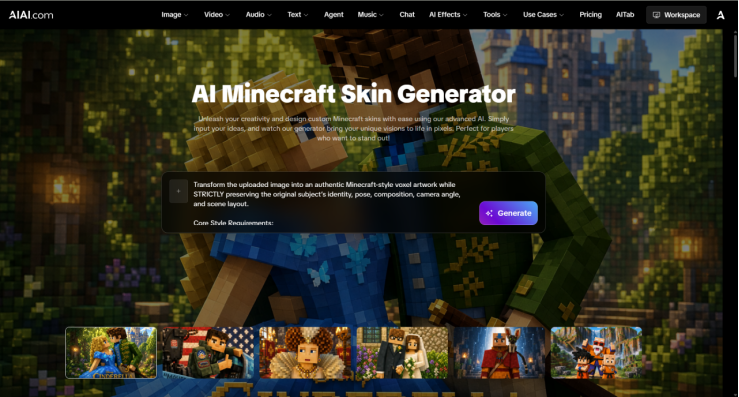
Head over to the main page of AIAI.com, where you’ll see the primary AI generation input box. Simply type in the description of the skin you want to create.
While simple prompts like “cool knight” will give you very generic results, you’ll get much better designs by describing the vibe, materials, and layers.
- Your Prompt Formula: [Character Type] + [Color Palette] + [Outfit Details] + [Special Features/Accessories]
- Example: “A sci-fi desert scavenger with glowing neon-green goggles, a dusty brown leather trench coat on the outer layer, and metallic silver boots.”
(Quick Tip: Specifying “outer layer” in your prompt on the homepage helps the AI know where to place 3D details like jackets, capes, or hoods in the final template.)
Step 2: Click “Generate” and Choose Your Model Type
Once you have entered your prompt in the text box on the homepage, click the Generate button. The AI will process your design in seconds and render a 3D interactive preview of your character.
Ready to Test Your First AI Concept?
The best way to understand how AI fits into your design process is to stop reading about it and actually start playing with it.You don’t need a background in complex pixel-art or shading editors to get started. Whether you’re trying to figure out a themed outfit for an upcoming server event, or just want to see how weird your favorite anime character would look in blocks, AI makes the process incredibly accessible.Head over to AIAI.com, type in a style you’ve been curious about, and let the generator do the heavy lifting. You might just be surprised at how quickly a wild idea in your head becomes an inspiring, ready-to-use skin.
Artificial Intelligence – The Data Scientist