
SPF Record Check: The Complete Guide To Verifying Your Email Authentication
 0
0
 0
0
Email continues to be a vital communication resource for both businesses and individuals. However, with the increasing reliance on email also comes a rise in risks such as spam, phishing, and email spoofing. Cybercriminals often try to fake legitimate domains to deceive users into disclosing personal information or downloading harmful files. This highlights the importance of SPF (Sender Policy Framework) in ensuring email security.
Conducting a check on SPF records is essential to confirm that a domain’s SPF settings are accurately configured and operational. By routinely verifying SPF, organizations can ensure that only authorized servers are permitted to send emails for their domain. This not only enhances email deliverability but also mitigates the chances of spoofing, thereby safeguarding both the sender and the recipient against fraudulent communications.
What Is an SPF Record?
An SPF record is a specific type of DNS (Domain Name System) entry that indicates which email servers are allowed to send emails for a particular domain. It functions by providing a list of approved sending servers within the domain’s DNS configuration.
When an email is dispatched, the receiving mail server looks up the SPF record associated with the sender’s domain. It then checks if the IP address of the sending mail server is included in that list of authorized servers. If the sending server is found on the list, the email successfully passes the SPF verification; otherwise, it may be marked as suspicious or denied.
SPF plays a crucial role in contemporary email authentication and is frequently employed in conjunction with DKIM (DomainKeys Identified Mail) and DMARC (Domain-based Message Authentication, Reporting, and Conformance) to enhance email security measures.
Why SPF Record Checks Are Important
Routine verification of your SPF record is vital for ensuring proper email authentication for your domain. If not regularly checked, misconfigured SPF settings can lead to legitimate emails failing to authenticate or being classified as spam.
There are multiple reasons why it’s crucial to perform SPF checks:
- Combat email spoofing: Protects against unauthorized servers sending emails that appear to be from your domain.
- Enhance email deliverability: A well-set SPF record increases the chances of emails landing in recipients’ inboxes instead of their spam folders.
- Safeguard brand integrity: Shields your domain’s reputation from being tarnished by phishing attacks.
- Spot configuration issues: Identifies errors such as incorrect syntax, missing elements, or an overload of DNS queries.
- Meet authentication standards: Many email providers require proper SPF configuration as a compliance measure.
For businesses that depend on email marketing, customer interaction, or transactional messaging, it is important to conduct SPF checks regularly to ensure consistent email delivery.

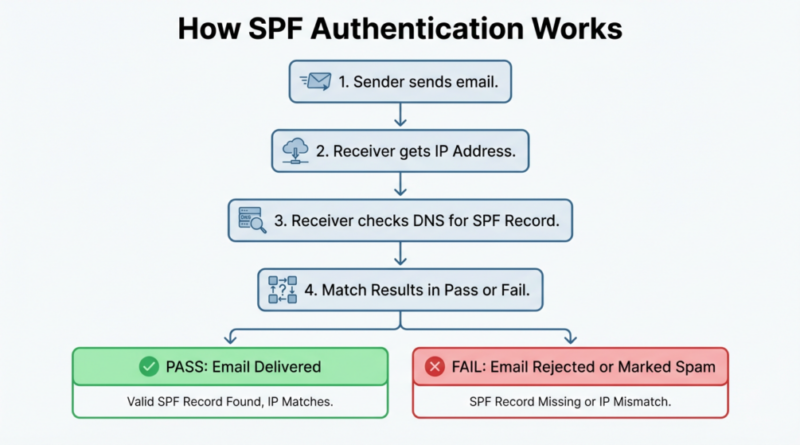
How SPF Authentication Works
SPF authentication functions by confirming that an email originates from a server permitted by the domain’s owner. Upon receiving a message, the recipient’s email server queries the domain’s SPF record in the DNS to identify the servers that are allowed to send emails on its behalf. It then assesses whether the IP address of the sending server is on this authorized list. If there’s a match, the email is considered legitimate; if not, it could be marked as potentially harmful or outright denied.
The Email Sending Process
Upon sending an email, the sender’s mail server reaches out to the recipient’s server to deliver the message. During this interaction, the recipient’s server examines several authentication protocols.
A key initial step is the SPF validation. The recipient’s server takes the domain from the sender’s email address and consults the DNS records associated with that domain to obtain the SPF record.
The Verification Process
Once the SPF record is obtained, the receiving server examines the permitted IP addresses or servers. It checks the sending server’s IP against this list.
If the sending IP is on the list, the SPF verification is successful. If it’s absent, the verification fails. The receiving server then determines the appropriate action for the message, taking into account the SPF outcome and other authentication indicators.
SPF Result Outcomes
SPF checks yield different outcomes:
- Pass: The server sending the email has permission.
- Fail: The server is not permitted to send emails.
- SoftFail: The server appears unauthorized, but is not fully rejected.
- Neutral: There is no specific policy in place.
- None: The domain lacks an SPF record.
- TempError or PermError: Errors — either temporary or permanent — arose during the evaluation process.
Grasping these results enables administrators to troubleshoot email authentication problems associated with SPF record assessments.
How to Perform an SPF Record Check
To check an SPF record, begin by confirming that your domain has a properly configured SPF record in its DNS settings. You can do this through online SPF lookup tools or DNS query applications that access and assess the TXT records associated with your domain. These tools will highlight any syntax mistakes, absent sending servers, or other configuration issues that could impact email verification. Alternatively, you can assess SPF by sending an email and examining the headers to see if the SPF check succeeds or fails.
Using Online SPF Checking Tools
A simple method to confirm your SPF record is to utilize online SPF record lookup services. These services access the SPF record stored in DNS and examine it for any issues.
Generally, you just have to input your domain name into the tool. It will then show the SPF record, identify any syntax errors, tally DNS lookups, and flag possible configuration issues.
These tools prove beneficial as they offer straightforward explanations for errors that could be challenging to detect otherwise.
Checking SPF Records Through DNS Lookup
A different approach is to directly query DNS records for the SPF configuration. This can be achieved using DNS lookup tools or command-line interfaces.
Performing a DNS lookup yields the TXT record linked to your domain, which holds the SPF policy. By examining this record, administrators can verify that the proper mail servers are included.
Such manual checks are especially valuable for IT professionals seeking a more comprehensive understanding of DNS responses.
Testing Email Authentication
In addition to just fetching the SPF record, you can evaluate SPF functionality by sending an email to an inbox that shows authentication outcomes. Numerous services include SPF, DKIM, and DMARC results within the email headers.
By examining these authentication outcomes, administrators can verify if emails sent from their domain successfully pass SPF validation during actual delivery situations.
Best Practices for SPF Record Verification
Consistently check your SPF record to make sure it lists all approved email sending services and eliminates any obsolete entries. Keep an eye on authentication reports to identify any unauthorized senders or spoofing risks. Simplify your SPF setup by minimizing the number of third-party email services to reduce DNS lookup times. For enhanced security and better email deliverability, it’s essential to pair SPF with DKIM and DMARC authentication methods.
Maintain an Updated SPF Record
Over time, organizations frequently integrate additional email services, including marketing automation tools, helpdesk systems, or transactional email providers. Each new service might need SPF authorization.
Consistently checking your SPF record helps ensure that all valid sending sources are correctly authorized.
Monitor Authentication Reports
Integrating SPF with DMARC reporting allows you to see how your domain’s emails are verified online.
Such reports can highlight any unauthorized senders trying to use your domain, aiding administrators in recognizing possible spoofing efforts.
Combine SPF with DKIM and DMARC
Relying solely on SPF is inadequate for comprehensive email authentication. Effective modern email security necessitates a multi-faceted strategy that incorporates DKIM signatures and DMARC policies.
When combined, these technologies enhance defenses against spoofing and phishing attempts and help ensure better delivery to inboxes.
Tools for SPF Record Checking
Various tools are available to efficiently check and troubleshoot SPF records.
- SPF Lookup Tools: These utilities fetch the SPF TXT record from DNS and present the configuration in a user-friendly format. They also check the syntax and highlight common mistakes.
- Email Header Analyzers: These tools enable administrators to analyze authentication outcomes from actual emails, indicating whether SPF checks were successful or unsuccessful during the delivery process.
- DNS Diagnostic Tools: Platforms for DNS diagnostics offer a comprehensive look at DNS records, helping identify issues like propagation delays, absent records, or conflicting settings.
By utilizing a mix of these resources, you can ensure precise SPF validation.
How Often Should You Check Your SPF Record?
SPF verification is not something to be done just once; it needs to be integrated into your ongoing email system upkeep.
Think about checking your SPF records in these scenarios:
- When introducing a new email service or marketing tool
- After making changes to DNS settings
- When diagnosing delivery issues
- During routine security assessments
- When setting up DMARC policies
Regular evaluations are crucial for ensuring that authentication remains effective as your email systems change over time.
Check your SPF record to ensure safe and effective email communication. By verifying your SPF settings, you can confirm that only authorized mail servers are allowed to send emails on behalf of your domain.
Consistent SPF checks help mitigate spoofing, enhance email delivery rates, and defend your organization’s standing. When used together with DKIM and DMARC, SPF forms a robust email authentication system that protects both senders and receivers.
Artificial Intelligence – The Data Scientist